





Free Medical Billing Audit Tools: Complete Guide to Reducing Errors and Maximizing Revenue
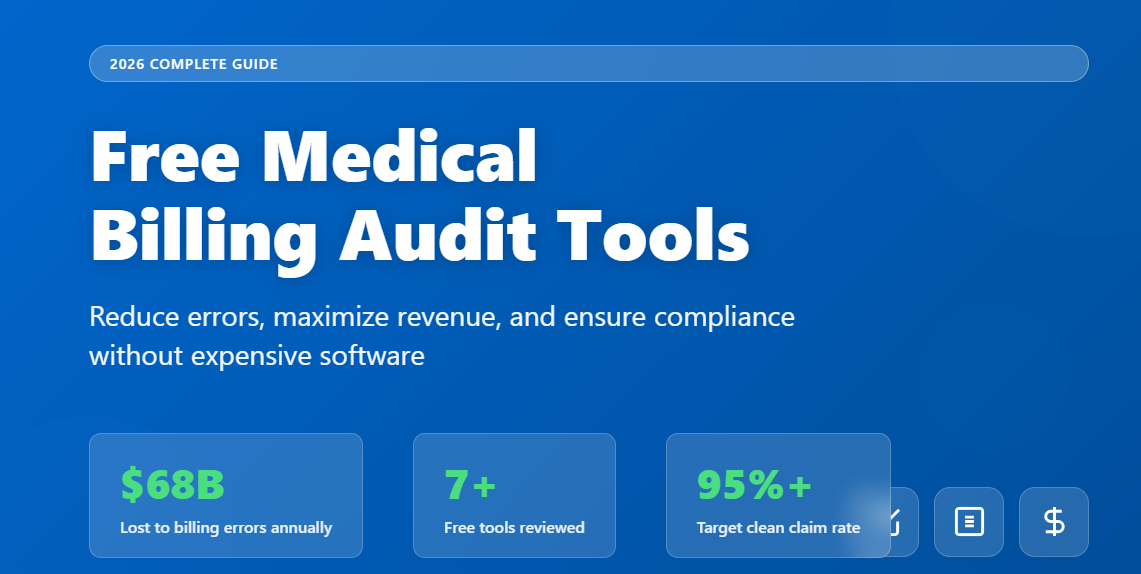
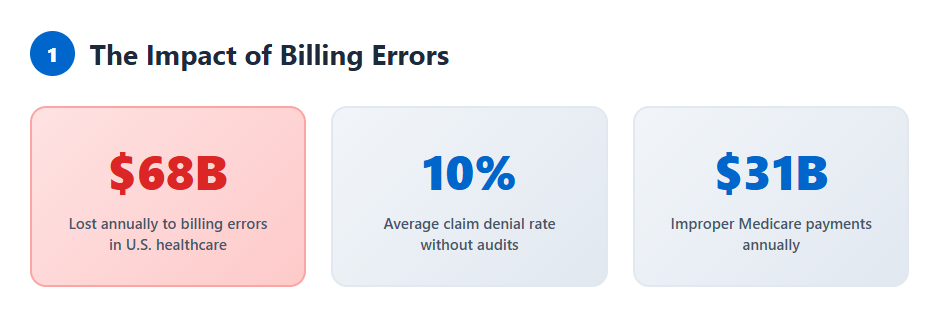
Medical billing errors cost U.S. healthcare providers an estimated $68 billion annually. Whether you’re a solo practitioner, part of a small clinic, or managing a multi-location practice, billing inaccuracies directly impact your revenue cycle and compliance standing.
The good news? You don’t need expensive enterprise software to catch costly mistakes. Free medical billing audit tools can help you identify claim errors, verify coding accuracy, and ensure compliance—all before claims reach payers.
This guide explores the best free audit tools available, how to use them effectively, and what to look for when choosing solutions that fit your practice’s needs.
What Is a Medical Billing Audit?
A medical billing audit is a systematic review of healthcare claims, documentation, and coding practices to ensure accuracy, compliance, and optimal reimbursement. These audits identify errors such as:
- Incorrect CPT or ICD-10 codes
- Missing or incomplete documentation
- Unbundling or upcoding issues
- Duplicate billing entries
- Modifier misuse
Why audits matter: The Office of Inspector General (OIG) reports that improper payments in Medicare fee-for-service programs alone exceeded $31 billion in recent years. Regular audits help practices avoid penalties, reduce denials, and improve cash flow.
Types of Medical Billing Audits
Understanding audit types helps you choose the right tools and approach:
Internal vs. External Audits
Internal audits are conducted by your own staff or billing team. They’re proactive, cost-effective, and allow you to identify issues before claims submission.
External audits are performed by insurance companies, government agencies (CMS, OIG), or third-party auditors. These are often reactive and can result in payment recovery demands or penalties.
Prospective vs. Retrospective Audits
Prospective audits review claims before submission, catching errors that would otherwise lead to denials.
Retrospective audits examine already-submitted claims to identify patterns, recover underpayments, or prepare for payer audits.
Benefits of Using Free Medical Billing Audit Tools
Free audit tools democratize access to quality assurance processes that were once only available to large health systems:
Cost savings: Eliminate monthly subscription fees while still maintaining billing accuracy.
Error prevention: Catch common mistakes like incorrect modifiers, bundling errors, or documentation gaps before claims go out.
Compliance verification: Stay aligned with CMS guidelines, LCD/NCD policies, and payer-specific requirements.
Revenue protection: Reduce claim denials and accelerate reimbursement cycles.
Educational value: Many tools provide explanations for errors, helping staff improve their coding knowledge over time.
Top Free Medical Billing Audit Tools
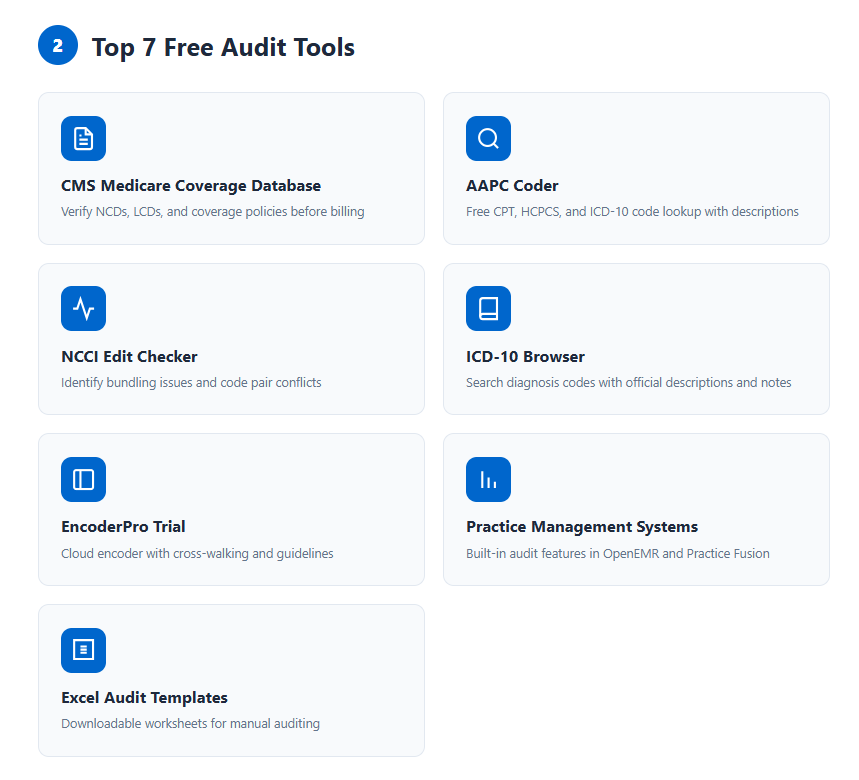
1. CMS Medicare Coverage Database (MCD)
What it does: Provides access to National Coverage Determinations (NCDs), Local Coverage Determinations (LCDs), and coverage articles.
Best for: Verifying coverage policies before billing, ensuring medical necessity documentation, and reviewing coding guidelines for specific procedures.
How to use it:
- Search by CPT/HCPCS code, ICD-10 code, or keyword
- Review LCDs for your MAC (Medicare Administrative Contractor) jurisdiction
- Check coverage limitations and documentation requirements
Access: CMS Medicare Coverage Database
2. AAPC Coder
What it does: Offers free code lookup for CPT, HCPCS, and ICD-10 codes with basic descriptions and guidelines.
Best for: Quick code verification, understanding code definitions, and checking for updates or deletions.
Key features:
- Cross-reference between coding systems
- Basic bundling information
- Annual code update alerts
Limitations: Advanced features like detailed coding scenarios require paid membership.
Access: AAPC Free Coder Tool
3. NCCI Edit Checker (via CMS)
What it does: The National Correct Coding Initiative (NCCI) edits prevent improper payment when incorrect code combinations are reported.
Best for: Identifying bundling issues, modifier requirements, and column 1/column 2 code pair conflicts.
How it works:
- Download quarterly NCCI edit files from CMS
- Check if your code pairs are listed as mutually exclusive or column 1/2 edits
- Determine if appropriate modifiers can bypass the edit
Access: CMS NCCI Edits
4. ICD-10 Browser (WHO or CMS)
What it does: Searchable database of all ICD-10-CM diagnosis codes with official descriptions and coding notes.
Best for: Verifying diagnosis code accuracy, checking for specificity requirements, and understanding code hierarchy.
Features:
- Search by code or keyword
- View includes/excludes notes
- See code-first and use-additional-code instructions
Access: ICD-10 Data or CMS ICD-10
5. EncoderPro Free Trial
What it does: Cloud-based encoder with limited free access or extended trial periods.
Best for: Cross-walking between code sets, checking LCD/NCD requirements, and accessing coding guidelines.
Trial features typically include:
- CPT, HCPCS, ICD-10 lookups
- Basic edits and bundling checks
- Limited monthly searches
Note: Fully featured version requires subscription after trial.
6. Practice Management System (PMS) Built-in Audits
What it does: Many free or low-cost PMS platforms include basic audit features.
Best for: Real-time claim scrubbing, identifying duplicate entries, and checking for common billing errors.
Examples:
- OpenEMR (open-source, includes basic billing audit features)
- Practice Fusion (free tier with limited audit capabilities)
Features to look for:
- Pre-submission claim validation
- Denial tracking and reporting
- Coding accuracy alerts
7. Free Excel Templates and Audit Worksheets
What it does: Downloadable spreadsheets designed for manual billing audits.
Best for: Small practices conducting periodic internal audits, tracking specific payer patterns, or documenting audit findings.
Where to find them:
- AHIMA (American Health Information Management Association) resources
- Professional billing forums and associations
- State medical associations
Typical components:
- Sample selection criteria
- Common error checklists
- Documentation requirements matrix
How to Conduct a Medical Billing Audit Using Free Tools
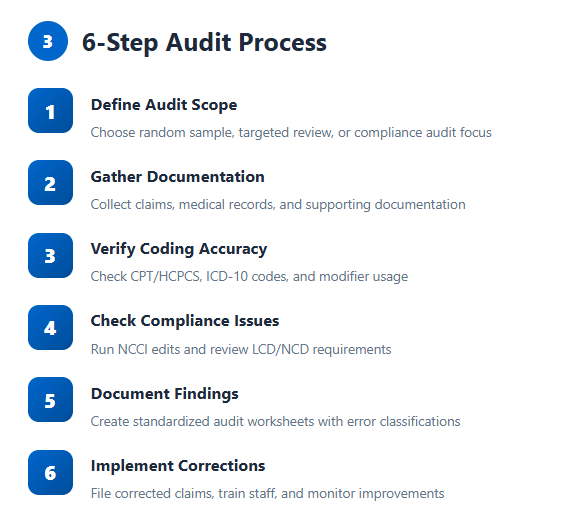
Step 1: Define Your Audit Scope
Determine what you’re auditing and why:
- Random sample: Pull 10-20 claims monthly for general quality assurance
- Targeted review: Focus on high-dollar procedures, frequent denials, or specific payers
- Compliance audit: Review coding for a particular service line or provider
Step 2: Gather Claims and Documentation
Collect the necessary materials:
- Submitted claim forms (CMS-1500, UB-04)
- Medical record documentation
- Encounter notes and procedure reports
- Previous correspondence from payers
Step 3: Verify Coding Accuracy
Use free tools to check each element:
CPT/HCPCS codes:
- Confirm code matches documented procedure
- Verify appropriate level of service (E/M codes)
- Check for deleted or updated codes
ICD-10 diagnosis codes:
- Ensure medical necessity support
- Verify specificity (5th, 6th, 7th character requirements)
- Confirm code-first sequencing when applicable
Modifiers:
- Validate appropriate modifier use (25, 59, etc.)
- Check NCCI edits for modifier requirements
- Ensure modifier supports separate payment
Step 4: Check for Bundling and Compliance Issues
Run code pairs through NCCI checker:
- Identify column 1/column 2 conflicts
- Determine if modifiers can override edits
- Flag mutually exclusive procedures
Review LCD/NCD requirements:
- Confirm coverage for the specific diagnosis
- Verify frequency limitations
- Check documentation requirements
Step 5: Document Findings
Create a standardized audit worksheet that includes:
| Element | Finding | Error Type | Action Required | Educational Note |
|---|---|---|---|---|
| Claim #12345 | Modifier 25 missing | Coding error | Rebill with modifier | E/M same day as procedure requires 25 |
| Claim #12346 | Insufficient documentation | Documentation | Request addendum | Procedure note lacks medical necessity |
Step 6: Implement Corrective Actions
Based on audit results:
- Immediate corrections: File corrected claims or appeals
- Process improvements: Update coding guidelines, create job aids
- Staff education: Conduct training on identified error patterns
- Monitoring: Schedule follow-up audits to measure improvement
Key Features to Look for in Audit Tools
When evaluating free tools, prioritize these capabilities:
Essential Features
Real-time code validation: Catches errors at the point of entry, not weeks later when claims deny.
LCD/NCD integration: Automatic policy checking prevents medical necessity denials.
NCCI edit checking: Identifies bundling issues before submission.
Denial tracking: Helps you spot patterns and systemic issues.
Advanced Features (Worth Upgrading For)
AI-powered analytics: Identifies trends across large claim volumes.
Automated sample selection: Creates statistically valid audit samples.
Benchmarking data: Compares your metrics against specialty peers.
Custom reporting: Generates audit reports for stakeholders or compliance purposes.
Common Medical Billing Errors Free Tools Can Catch
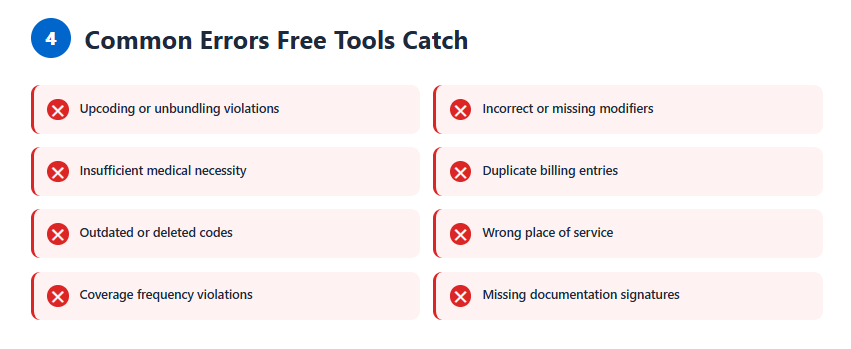
Coding Errors
- Upcoding: Billing higher-level service than documented
- Unbundling: Separately billing components of a comprehensive code
- Incorrect modifiers: Missing or inappropriate modifier use
- Outdated codes: Using deleted or revised CPT codes
Documentation Errors
- Insufficient medical necessity: Diagnosis doesn’t support procedure
- Missing signatures: Unsigned or undated clinical notes
- Incomplete documentation: Gaps in required elements (history, exam, MDM)
Billing Process Errors
- Duplicate billing: Same service billed multiple times
- Wrong patient demographics: Insurance ID, date of birth errors
- Incorrect place of service: Office vs. facility designation errors
- Frequency violations: Exceeding covered visit limits
Free vs. Paid Audit Tools: Making the Right Choice
When Free Tools Are Sufficient
Free tools work well for:
- Small practices (1-3 providers) with manageable claim volumes
- Specialty practices with limited coding complexity
- Startups establishing initial quality processes
- Supplemental audits alongside existing systems
When to Consider Paid Solutions
Invest in paid tools when:
- Claim volume exceeds 500+ monthly
- Multiple specialties or complex coding scenarios
- Frequent payer audits or high denial rates (>10%)
- Dedicated compliance or audit staff needs advanced features
- Integration with PM/EHR systems is essential
Cost-benefit calculation: If catching just one major error monthly saves more than the subscription cost, paid tools often justify themselves.
Best Practices for Medical Billing Audits
Create a Regular Audit Schedule
Monthly: Random sample of 10-20 claims across all providers Quarterly: Targeted review of top denial reasons or high-dollar services Annually: Comprehensive audit of specific specialty codes or compliance areas
Develop Standard Audit Protocols
Document your audit process:
- Sample selection methodology
- Audit criteria and scoring
- Documentation review checklist
- Error classification system
- Corrective action procedures
Train Your Team
Effective audits require knowledgeable staff:
- Ensure coders understand coding guidelines and updates
- Train billing staff on common error patterns
- Educate providers on documentation requirements
- Create feedback loops between auditors and coders
Use Audit Results Strategically
Don’t just identify errors—use findings to:
- Update coding policies and procedures
- Create provider-specific educational sessions
- Negotiate better contracts based on clean claim rates
- Prepare for external audits or RAC reviews
Maintain Audit Documentation
Keep comprehensive records:
- Audit work papers and supporting documentation
- Corrective action plans and implementation dates
- Training materials and attendance records
- Follow-up audit results showing improvement
Integration with Your Existing Workflow
Prospective Auditing Workflow
- Pre-submission review: Use free tools to check claims before they leave your system
- Flag suspicious claims: Identify high-risk claims for manual review
- Clean and correct: Fix errors before submission
- Submit with confidence: Reduce denial rates and accelerate payment
Retrospective Auditing Workflow
- Pull claim sample: Select claims based on age, payer, or denial history
- Conduct audit: Use free tools to verify coding and compliance
- Identify patterns: Look for systemic issues, not just individual errors
- Implement changes: Update processes, retrain staff, file corrected claims
- Monitor improvement: Track key metrics over time
Measuring Audit Effectiveness
Track these key performance indicators (KPIs):
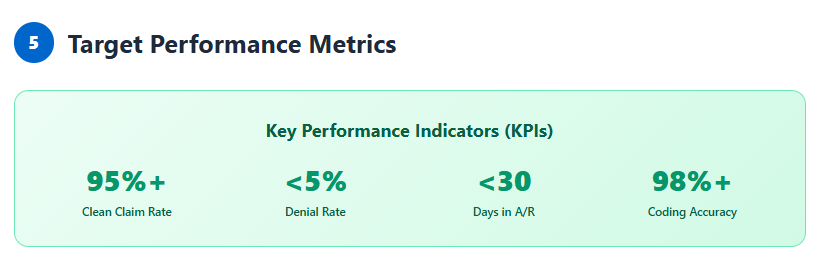
Clean claim rate: Target >95% first-pass acceptance Denial rate: Aim for <5% overall denial rate Days in A/R: Monitor for improvement in collection speed Coding accuracy rate: Track errors per claims audited Revenue recovered: Measure underpayment corrections identified
Future of Medical Billing Audits
The audit landscape is evolving rapidly:
AI and machine learning: Predictive analytics identify high-risk claims before submission.
Real-time payer validation: Direct connection to payer systems for instant eligibility and coverage checks.
Blockchain verification: Immutable audit trails for compliance documentation.
Natural language processing: Automated review of clinical documentation for coding accuracy.
Many of these technologies are filtering down from enterprise systems to accessible, free, or low-cost tools.
Frequently Asked Questions
How often should I audit my medical billing?
Conduct monthly spot-checks of 5-10% of claims as a baseline. Increase frequency if you’re experiencing high denial rates (>10%), recently changed EHR systems, added new providers, or face upcoming external audits. High-risk specialties like oncology or pain management benefit from more frequent auditing.
Can free audit tools replace professional billing auditors?
Free tools are excellent for routine quality checks and error prevention, but they can’t replace human expertise for complex compliance issues, payer-specific nuances, or preparing for OIG audits. Think of free tools as your first line of defense—use professional auditors for comprehensive annual reviews or when facing serious compliance concerns.
What’s the difference between a billing audit and a coding audit?
A coding audit focuses specifically on the accuracy of CPT, ICD-10, and HCPCS codes assigned to services. A billing audit is broader—it examines the entire revenue cycle including charge entry, claim submission, payment posting, and denial management. Most comprehensive audits include both coding accuracy and billing process review.
How do I know if an audit tool is HIPAA compliant?
HIPAA compliance depends more on how you use tools than the tools themselves. When using free online tools, never enter patient identifiers (names, dates of birth, MRNs). Use only de-identified data like CPT codes, diagnosis codes, and procedure details. For cloud-based tools that require PHI, ensure they have a Business Associate Agreement (BAA) in place.
What should I do if an audit reveals significant errors?
First, stop the error source immediately—update policies, retrain staff, or fix system issues. Second, quantify the scope—determine how many claims were affected and the financial impact. Third, file corrected claims or refunds as appropriate. Fourth, document everything for compliance purposes. Consider consulting a billing attorney if errors involve potential fraud indicators or significant overpayments.
Are there free audit tools specifically for dental or mental health billing?
Yes, though they’re less common than medical billing tools. The ADA provides free access to CDT codes for dental procedures. Mental health providers can use the standard CMS tools for CPT and ICD-10 codes, as psychiatry and psychology primarily use E/M codes and behavioral health diagnoses. Specialty-specific forums and associations often share free audit templates tailored to dental and mental health billing patterns.
Summary: Maximizing Value from Free Audit Tools
Free medical billing audit tools offer substantial value for practices committed to billing accuracy and compliance. While they may lack the advanced features of enterprise solutions, strategic use of free resources can significantly reduce claim errors, prevent denials, and protect revenue.
The key is combining multiple free tools into a comprehensive audit strategy. Use CMS resources for policy verification, AAPC tools for code lookups, NCCI checkers for bundling issues, and standardized audit worksheets for documentation. Establish regular audit schedules, train your team on proper use, and track improvement over time.
Remember that no tool—free or paid—replaces knowledgeable staff and sound billing processes. Invest in ongoing education, stay current with coding updates, and maintain open communication between coders, billers, and providers.
Take Action: Start Auditing Today
Ready to improve your billing accuracy and maximize revenue? Start with these immediate steps:
- Bookmark essential free tools: Save links to CMS MCD, AAPC Coder, and NCCI edits for quick access
- Schedule your first audit: Block time this week to review 10 recent claims using the step-by-step process outlined above
- Create an audit template: Download or build a simple spreadsheet to track findings and corrective actions
- Educate your team: Share this guide with billing staff and schedule a brief training session on using free audit tools
Need help getting started? Join billing forums like those at AAPC or AHIMA where experienced professionals share audit tips, templates, and best practices. Many state medical associations also offer free resources and support for member practices.
The cost of undetected billing errors far exceeds the time investment in regular audits. With the free tools and strategies outlined in this guide, you have everything you need to protect your practice’s revenue and maintain compliance in 2026 and beyond.